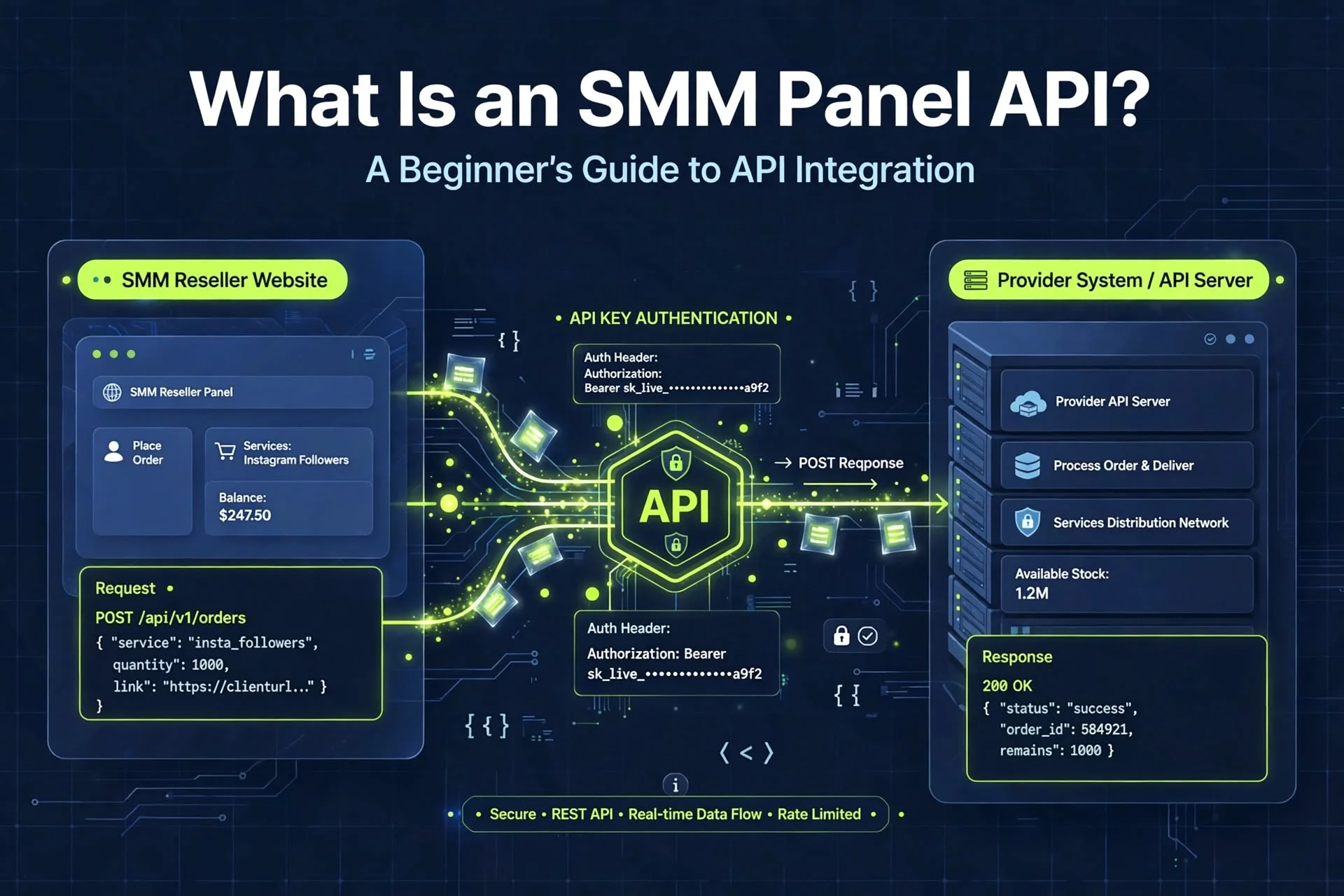
What Is an SMM Panel API? A Beginner’s Guide
What Is an SMM Panel API? A Beginner’s Guide to API Integration
An SMM panel API can help businesses automate certain tasks when managing social media marketing services. For resellers, agencies, and developers, an API can connect one platform to another and reduce the need to process every order manually.
However, understanding how an API works is important before integrating it into a website or business workflow.
In this guide, we will explain what an SMM panel API is, how it works, which functions it may support, and what to consider before choosing an API provider.
What Is an SMM Panel API?
An API, or Application Programming Interface, allows two software applications to communicate according to a defined set of rules.
In an SMM panel environment, an API may allow a reseller website to communicate with a service provider's system. Depending on the provider's supported functions, the reseller may be able to retrieve service information, submit orders, and check order statuses automatically.
For example, a reseller might operate a website where customers select a service and submit an order. An API integration can send the required order information to a compatible provider without requiring the reseller to enter the same information manually.
The exact features available depend on the provider's API documentation.
How Does an SMM Panel API Work?
A typical API integration involves several steps.
Step 1: Obtain API Access
The provider supplies API documentation and the credentials needed to authenticate requests. These credentials may include an API key or another approved authentication method.
Access rules differ between providers, so review the documentation before beginning.
Step 2: Connect Your Website
A developer configures the website to communicate with the provider's API. This usually involves sending structured requests to the provider's documented endpoints.
The integration must follow the provider's requirements for authentication, request formats, and supported actions.
Step 3: Retrieve Service Information
If supported, the API can return information about available services, such as service identifiers, names, descriptions, and prices.
Your website can use this information to display relevant options to customers.
Step 4: Submit an Order
When a customer places an order, the website validates the submitted information and sends an order request to the provider.
The integration should check the response carefully. A request being sent does not necessarily mean the order has been accepted or completed.
Step 5: Check Order Status
If the API supports status checking, your system can retrieve updates about an order.
Possible statuses may include pending, processing, completed, partial, or cancelled, depending on the provider's terminology.
A well-designed integration should handle delays, errors, and unexpected responses appropriately.
Common Features of an SMM Panel API
Not every API supports the same operations. Common functions may include the following.
Service List
The service-list function returns available services and associated information. This can help a reseller keep service listings organised.
Add Order
An order-submission function allows a connected website to submit an order using the required service identifier and order details.
Order Status
A status function can return information about an individual order, allowing the website to display updates.
Multiple Order Statuses
Some providers support retrieving status information for several orders in one request. This can be useful when managing a larger number of orders.
Balance Check
A balance function may allow the reseller to retrieve information about the available account balance with the provider.
Refill or Cancellation Requests
Some APIs support refill or cancellation requests for eligible orders. These functions are not universal, and a request may be rejected if the service or order does not qualify.
Always confirm the available operations in the provider's official documentation.
What Are the Benefits of API Integration?
Less Manual Work
API integration can reduce repetitive tasks such as copying order information between systems.
Faster Order Processing
Automated requests can help a connected website submit orders without manual forwarding. Actual processing and delivery times still depend on the provider and service.
Centralised Order Management
A reseller can display order information in its own dashboard, depending on the functions supported by the API and the features built into the website.
Easier Business Scaling
Automation may help a business handle more orders without increasing manual work at the same rate. Scaling still requires appropriate infrastructure, monitoring, and customer support.
Better Workflow Integration
An API can connect compatible systems, allowing a business to build workflows that fit its operating requirements.
API Integration vs. Manual Order Processing
Manual order processing involves a person entering or forwarding order information. API integration allows compatible systems to exchange information automatically.
Manual processing can be sufficient for a small operation with limited order volume. An API may be useful when the business needs to manage more orders or connect multiple systems.
Neither approach guarantees service quality. Both require accurate order information, clear policies, and a process for resolving problems.
How to Choose the Right SMM Panel API Provider
Before integrating an API, evaluate the provider carefully.
1. Read the API Documentation
Documentation should explain authentication, available endpoints, required parameters, response formats, and error handling.
Clear documentation makes implementation and troubleshooting easier.
2. Check Supported Functions
Confirm that the provider supports the operations your website needs. Do not assume that every API includes balance checks, refills, cancellations, or bulk status requests.
3. Review Pricing and Account Requirements
Understand how services are priced, whether there are account requirements, and how the provider handles balance changes or rejected orders.
Calculate your costs before offering services to customers.
4. Evaluate Support
Check how developers can report API errors or request technical assistance. Reliable documentation and an identifiable support process are useful when problems arise.
5. Review Security Practices
Understand how the API authenticates requests and how credentials should be stored. Avoid providers that require unnecessary access to your website or customer information.
6. Test Before Launching
Use a permitted test environment if one is available. Otherwise, follow the provider's instructions for safe testing and avoid placing unnecessary live orders.
Verify that your integration handles valid requests, rejected requests, timeouts, and unexpected responses correctly.
SMM Panel API Security Best Practices
API credentials should be treated as confidential information.
Follow these practices when developing an integration:
- Store API keys on the server rather than exposing them in public browser code.
- Never publish API credentials in a public repository.
- Use HTTPS when communicating with the provider.
- Validate customer input before sending requests.
- Handle errors without exposing confidential technical details.
- Apply appropriate access controls to administrative functions.
- Monitor unusual request patterns and failed operations.
- Rotate credentials if they are exposed or compromised.
- Follow the provider's rate limits and usage rules.
These measures help reduce common integration risks, but they do not replace a broader security review.
Common API Integration Problems
Authentication Errors
Requests may fail if credentials are incorrect, expired, or sent in the wrong format. Check the authentication instructions and keep credentials secure.
Invalid Parameters
An API request may be rejected if a required parameter is missing or has an unsupported value. Validate input against the documentation.
Incorrect Service IDs
A service identifier can be invalid or may no longer be available. Refresh service information when appropriate and handle unavailable services gracefully.
Timeouts and Network Errors
A request may time out even when the provider is temporarily processing it. Avoid blindly repeating order-submission requests, because doing so could create duplicate orders.
Use the provider's documented retry rules and, where supported, a unique request identifier or another duplicate-prevention mechanism.
Status Synchronisation Issues
Your website may not immediately reflect a status change. Use the provider's documented status-checking process and make sure your system handles temporary inconsistencies.
Frequently Asked Questions
What is an SMM panel API used for?
An SMM panel API can connect compatible websites and service-provider systems. Depending on its features, it may support service-list retrieval, order submission, status checking, and other operations.
Do I need programming skills to use an SMM panel API?
Some platforms offer built-in API integration options, while custom integrations generally require development skills. The amount of work depends on the website, provider, and required features.
Is every SMM panel API the same?
No. API authentication, available functions, parameters, response formats, and usage limits vary between providers.
Can an API automatically complete every order?
No. An API can automate supported requests and retrieve available updates, but it cannot guarantee that a service will be delivered successfully or within a particular timeframe.
Is API integration secure?
Security depends on how the provider and the connected website handle authentication, credentials, data, permissions, and errors. Review the documentation and apply appropriate security practices.
Final Thoughts
An SMM panel API can help resellers and developers automate supported operations, manage order information, and connect compatible systems. However, successful integration requires more than obtaining an API key.
Review the documentation, confirm the supported functions, protect your credentials, test the integration carefully, and prepare for errors and failed requests.
If you are exploring SMM panel solutions, review the available information on SMMMarkets and confirm the current API features and requirements before planning an integration.
A reliable workflow begins with clear documentation, careful implementation, and realistic expectations.